FAQ
Last Updated: January 3, 2024
What is Yesway & Allsup’s Rewards?
Yesway & Allsup’s Rewards is a loyalty program that rewards customers with Smiles for fuel and in-store purchases. Smiles are like points and can be accumulated and then redeemed for Rewards.
How do I join Yesway & Allsup’s Rewards?
Joining is easy. Just enter your mobile number at the register pin pads or at the pumps on your next visit to a participating Yesway or Allsup’s location. When your transaction is complete you will receive an SMS text message with a “magic” link. This link is unique to your mobile number and will lead you to your Yesway & Allsup’s Rewards account. You can also receive an SMS text message with a magic link through the Yesway & Allsup’s Rewards mobile application or the mobile web experience (at m.yeswayallsupsrewards.com). Although not required, to take advantage of all of the benefits of the Program, you will be asked to provide additional information, including a valid email address and your date of birth.
What is a “magic” link?
The magic link is a unique link sent to the phone number you provide during a transaction or through the Yesway & Allsup’s Rewards mobile application that will lead you to your Yesway & Allsup’s Rewards account.
What if I had an account in a previous version of Yesway Rewards or Allsup’s Rewards?
If you had a previous account, when you enter your mobile number the first time (as long as it is the same number on your old account), you will get a magic link that opens up to your account that has your information (name, email, birthdate) and any applicable Smiles and/or Rewards balances from your previous account.
What if I have a new phone number or I don’t see everything that I had on my previous account?
Contact us by clicking here and we will update your account for you. Please provide your current mobile number as well as email address and phone number from your previous account.
How do I access my account?
You can access your account by downloading and opening the Yesway & Allsup’s Rewards app or going to m.yeswayallsupsrewards.com and entering your mobile number. This will send you an SMS text message with a magic link that is unique to your account. Tap the link to access your Yesway & Allsup’s Rewards account.
Can I access my account from a desktop computer?
No. You can go to www.yeswayallsupsrewards.com and submit your mobile number. This will send an SMS text message to your mobile phone with the magic link to your account.
Do I need to download the app?
No. You can receive the magic link to access your account when you make a transaction, or when you go on a mobile web browser by navigating to m.yeswayallsupsrewards.com and providing your mobile number. After you provide your phone number you will be sent a SMS text message with a “magic” link to a unique web address to access your account in a mobile web browser. The mobile web experience version of your account is identical to the digital experience of the app, but lives within a unique web address instead.
What if I don’t have a smartphone?
Full participation in Yesway & Allsup’s Rewards requires a smartphone that can receive SMS messages and allow you to access the account through the magic link. However, all Member Pricing promotions in participating Yesway and Allsup’s locations are available to members with just a phone number.
How much does it cost to join Yesway Rewards?
Nothing — it is Free!
Who can join?
Any person 16 years or older. However, if you are between the ages of 16 and the civil age of majority, which is 18 or 19 depending on your state of residence, you may only enroll with the permission of your parent or legal guardian.
How do I earn Smiles?
You will earn ten (10) Smiles for each dollar you spend on qualified in-store purchases and five (5) Smiles for each gallon of gas you purchase. In-store Smile calculations are based on rounding up to the nearest $.10, so the minimum amount spent to earn a Smile would be $.05, which will earn you one Smile. At the pump Smile calculations are based on rounding up to the nearest 0.2 of a gallon, so the minimum amount pumped to earn a Smile would be 0.1 gallons.
Will my Smiles be added to my account immediately?
Generally, Smiles will be added to your account in real time at the conclusion of your purchase.
Is there anything that I will not earn Smiles?
Customers will not earn Smiles for any purchase of gift and prepaid cards, phone cards, purchases at Subway® or any other third-party restaurant, bottle deposits, financial services such as bill pay or money orders, sales and other taxes, tips, delivery fees, donations, lottery and video poker, bitcoin or similar machines, air pumps, EV charges, car washes and any items for which Yesway is not legally permitted to grant Smiles.
Do Smiles expire?
Yes. If Smiles are not redeemed for Rewards within one year of being earned, they will expire and be removed from your account.
What Rewards are Available to me?
All Rewards are available at the discretion of Yesway and may vary from user to user. Available Rewards generally consist of things like free or discounted items, birthday Rewards, enrollment Rewards, and other benefits such as Stack & Save Fuel Rewards, Member Pricing, and access to Sweepstakes, Clubs, Special Offers and other Promotions.
Do I need to complete my profile in order to earn and redeem Rewards?
Members who do not complete their profile can earn Smiles and take advantage of Member Pricing promotions. Completing the member profile is required to participate in the rest of the program, which includes, but is not limited to, redeeming Smiles, earning and redeeming Stack & Save Fuel Rewards, participating in Sweepstakes and Clubs, and getting Special Offers.
How do I redeem my Smiles for Rewards?
You can redeem Smiles for Rewards in the “Redeem” section of the app or mobile web experience. Any Rewards received can be used on your next visit. Press the “+” symbol next to the Reward of your choosing to add it to your account.
How do I use my rewards?
Once you have redeemed your Smiles for a Reward, you generally will have 30 days to claim your Reward unless otherwise noted.
To claim your Reward in Store, follow these steps:
- Select your Reward item and proceed to the register as you would for a normal purchase.
- Store associate will scan your item(s) and ask you to enter your mobile number.
- Associated discounts will apply automatically to your purchase.
- Pay as you normally would, if necessary.
To claim your Reward at the pump, follow these steps:
- Before fueling, select “Loyalty” on the credit card terminal and enter your mobile number.
- If you have a Stack & Save Fuel Reward, you will be prompted to redeem it, and, if you select “Y”, the pump will automatically roll back the price of the fuel.
- Pay as you normally would.
What if I change my mind after redeeming Smiles for a Reward?
If you have not redeemed a Reward for the free or discounted item and the Reward has not expired, you generally can return the Reward and get your Smiles back by following these steps:
- Open app or access account via m.yeswayallsupsrewards.com
- Tap on “Ready to use Rewards” located at the top of the home screen under your name
- Tap on the Reward that you would like to return
- Tap on the “Return Reward” button at the bottom of the screen
- Tap “Confirm”
Can I stack fuel rewards?
Yes, fuel Rewards are stackable so you can build up your savings. Stack & Save!
But I see multiple Fuel Reward vouchers in my Ready to Use Rewards, will they all apply to my transaction?
Yes. Each fuel Reward you earn is a separate voucher, however, your stacked fuel Reward vouchers will each apply one at a time to your fuel purchase, until either you run out, or the remaining fuel Reward vouchers are equal to or greater than the rolled back price of gas.
If I have more fuel Rewards than the current price of gas, will the balance carry over for my next visit?
Yes. Your stacked fuel Reward vouchers will apply one at a time to your fuel purchase, until the remaining fuel Reward vouchers are equal to or greater than the rolled back price of gas. Any remaining vouchers will stay on your account until they are used on your next fill-up or they expire (most fuel Reward vouchers have an expiration date of 30 days).
Can I get gas for free?
Not quite. The lowest you can pay for a gallon of gas is $.01 per gallon, even if the total sum of your fuel Reward vouchers surpasses the current cost per gallon.
Can I use only a portion of the Fuel Reward vouchers on my account on a fill-up?
No. You cannot choose to use just a portion of your Fuel Reward vouchers. Vouchers will apply until they run out or the remaining Fuel Reward vouchers are greater than the rolled back price of gas.
Is there a gallon limit when redeeming my Fuel Reward vouchers?
Yes, when redeeming a fuel Reward, you can save on up to 30 gallons.
Can I fill up multiple vehicles when redeeming Fuel Reward vouchers?
No. For your safety, fuel transactions should be limited to one vehicle.
Can I use Rewards at a different location from where I earned the Smiles?
Yes! You can earn Smiles and redeem Rewards at any participating Yesway or Allsup’s location
Will there be any coupons to print out?
No. All Rewards will be available on your account, which you can access with your Yesway & Allsup’s Rewards app or by entering your mobile number at m.yeswayallsupsrewards.com.
How do I know how many Smiles I have?
Your Smiles balance is listed in the upper right hand corner of the home screen.
If I forgot to enter in my mobile number on my last visit, can I still get credit for that purchase?
Unfortunately no, we cannot credit transactions to your account after the fact.
How do I update my personal information?
In the app (or mobile web experience version of the app), tap the person icon in the upper right-hand corner of the home screen. Then tap your name to view and edit your information. You will not be able to edit your mobile number as that is your unique Rewards ID. If you need to change the mobile number associated with your account, please contact us by clicking here.
Are there tiers for more frequent customers?
Yes. When a member makes 12+ visits in one month, they will earn Super Smiles status for the following month and enjoy $0.03 per gallon savings on the first 30 gallons of each fill-up during that month.
There are also three tiers for professional drivers:
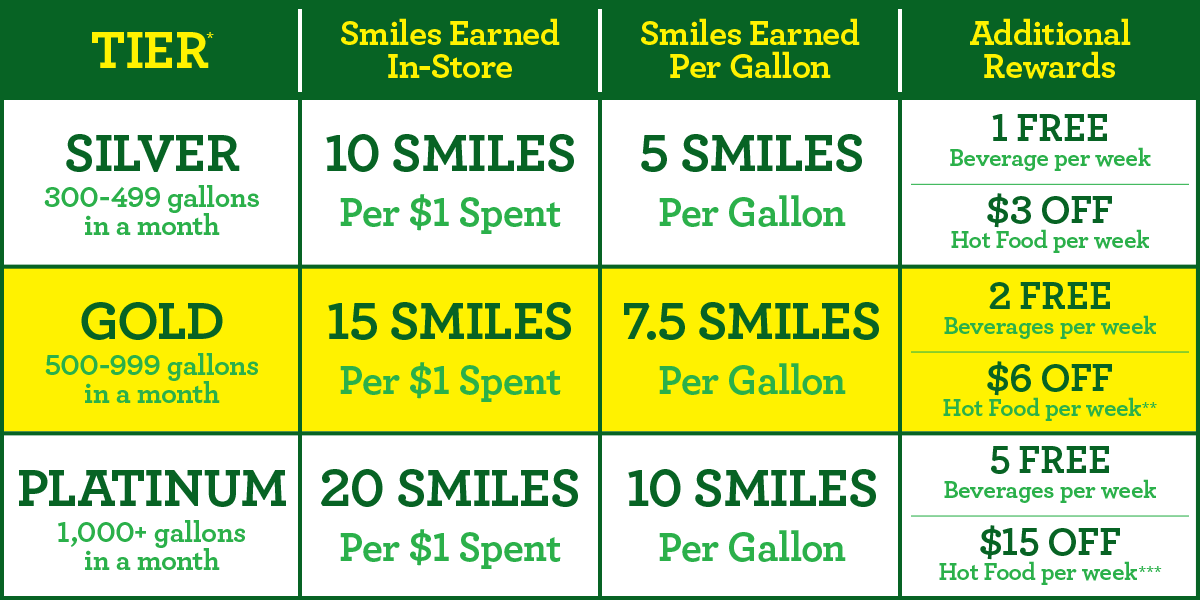
| Tier* | Smiles Earned In-Store | Smiles Earned Per Gallon | Additional Rewards |
|---|---|---|---|
| Silver 300-499 gallons in a month | 10 Smiles per $1 Spent | 5 Smiles per Gallon | 1 Free Beverage per week and $3 off Hot Food per week |
| Gold 500-999 gallons in a month | 15 Smiles per $1 Spent | 7.5 Smiles per Gallon | 2 Free Beverages per week and $6 off Hot Food per week** |
| Platinum 1,000+ gallons in a month | 20 Smiles per $1 Spent | 10 Smiles per Gallon | 5 Free Beverages per week and $15 off Hot Food per week*** |
*Member tiers are updated on the 1st of each month and are determined by total gallons in the previous month.
**$6 Off Hot Food = two $3 Off Hot Food Rewards
***$15 Off Hot Food = five $3 Off Hot Food Rewards
Is there a username and password to remember?
No. One of the benefits of accessing your account via your mobile number and the magic link is that you never have to remember a username and/or password to access your Yesway & Allsup’s Rewards account.
What if I have a problem with my account or have a question that is not answered here?
Please contact us by clicking here and we will be happy to assist you.
Can I opt out of receiving SMS text messages?
You can unsubscribe to marketing SMS messages at any time by texting STOP to 855-697-1213. You can also update your preferences in the app. Tap on the person icon in the upper right-hand corner of your Mobile Application or Mobile Web Page. Then tap Communication Preferences and use the toggle switch to opt in or out of receiving marketing messages.
The SMS text message that contains the magic link to your account will always be sent if you are inputting your mobile number at the registers or pumps. The action of entering your number is opting you in to receiving this message.
What if I don’t receive the SMS text message with my magic link?
Please try the troubleshooting steps below.
First, please delete the app. Log into m.yeswayallsupsrewards.com and login through the web browser version first. When you’re in, re-download the new Yesway & Allsup’s Rewards app and try logging in once more.
If this doesn’t work then try the below.
Not receiving the text
For troubleshooting steps, please try the following:
- Make sure your Yesway & Allsup’s Rewards app is updated (go to app store, search for Yesway & Allsup’s Rewards and make sure the button says “open”. If it says “update”, please update)
- Text START to 855-697-1213 to ensure you are opted in for receiving messages
- Check the spam folder for your device’s messages to see if the texts are there
- Ensure our number (855-697-1213) is not blocked
iPhone Blocked SMS
See if following these steps work:
- iPhone: Settings > Scroll up to reveal a Search Bar at the top of the screen > Type the word ‘Blocked’ > Click on “Blocked Contacts” at the bottom of the screen > scroll down again > click blocked contacts</span)
- If you see the number 855-697-1213 on that list, click ‘Edit’ on the top right-hand corner > click on the red ‘minus’ sign next to the number > hit unblock</span)
Android Blocked SMS
See if following these steps work for your Android:
- Open your text messages app.
- Look for a Search Bar at the top right-hand corner.
- Type the number 855-697-1213.
- You should see a prompt to remove this number from Spam.
- Afterward, try signing in as usual, and you should receive the texts.
If none of this works, please click here. In your response please provide your mobile number and a description of the issue so our customer service team can assist.
What if I cannot age verify?
First, make sure your phone is up to date on the latest software.
Then, make sure you have the most current version of the app downloaded before trying the age verification process again.
We suggest putting what is on your government ID first, then try any old addresses you may have.
Provide your mobile number & any screenshots in case this continues to give you issues so our customer service team can submit a ticket for further investigation.
Contact our support team by clicking here.
What is your privacy policy?
At Yesway we take your privacy very seriously. Rest assured we will never rent or sell your personal information. Click here to view our Privacy Policy.
Is there more information available, or official terms and conditions governing the Program?
Yes – see our Terms and Conditions here.